






Updated: 17 November 2026
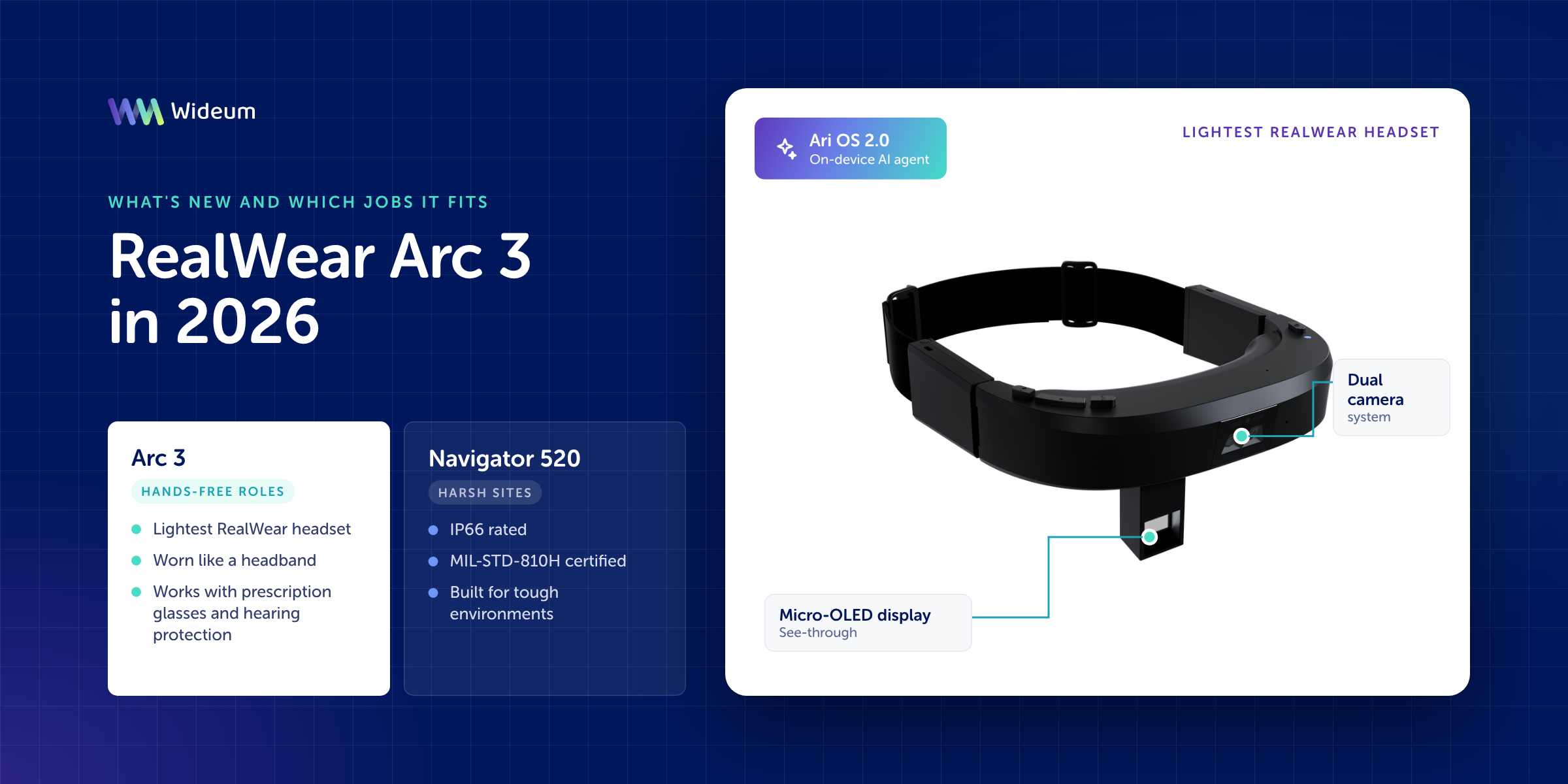
The RealWear Arc 3 is a voice-controlled assisted reality headset worn like a headband, and RealWear describes it as the lightest headset in its portfolio (RealWear). Its headline features are a see-through micro-OLED display, a dual-camera system and Ari OS 2.0 (RealWear). Ari OS 2.0 is the first deployment of the Ari OS software package on a RealWear device, and it includes Ari, which RealWear defines as an on-device AI agent (RealWear, 2025). In our assessment, the Arc 3 suits hands-free roles where workers already wear prescription glasses or hearing protection. In our view, the RealWear Navigator 520, which RealWear lists as IP66-rated and MIL-STD-810H certified (RealWear), is the better option for harsh sites.
What is the RealWear Arc 3?
The Arc 3 is RealWear’s headband-style assisted reality headset, controlled by voice, for workers who need information without touching a screen (RealWear). RealWear positions it as the lightest headset in its range (RealWear). According to RealWear, workers can use it to access documents, capture images, join video calls and run custom applications without touching a screen (RealWear).
In this article, assisted reality refers to a display that shows information in the wearer’s line of sight without replacing the view of the real environment. On the Arc 3, the display is see-through, so the wearer can still see their surroundings (RealWear).
Design and hardware: what changes for the wearer
In our view, the most important design points are weight and fit: the Arc 3 weighs 179 grams and is designed to work with prescription glasses and Peltor-style headsets (RealWear). In our view, this matters to buyers because compatibility with eyewear and hearing protection can decide whether a headset is worn for a full shift.
Display and cameras
The Arc 3 combines a see-through, full-colour micro-OLED display with two cameras. RealWear’s spec sheet lists the display as covering 95% of the DCI-P3 colour space (RealWear). The camera system has a 48 MP main camera and an 8 MP wide-angle sensor (RealWear). In our view, for remote assistance and inspection work, the camera determines how much detail a remote expert or a report can capture.
Audio, battery and sensors
The Arc 3 is built for voice use in noisy places: it has two internal speakers and four noise-cancelling microphones rated up to 100 dB (RealWear). Power comes from a rechargeable 2,000 mAh / 3.8 V lithium-polymer battery (RealWear). The battery charges via USB Type-C or the Arc 3 Base charging station (RealWear).
The headset also includes a wear detection sensor, a capacitive touchpad and a 2 MP black-and-white awareness sensor with a 149.7° field of view (RealWear).
For environmental protection, the headset is rated IP54 (with 1-meter drop resistance) and operates in temperatures from -20°C to 45°C (-4°F to 113°F) at 10%–80% non-condensing relative humidity.
Ari OS 2.0 and the ‘Hey Ari’ voice agent
Ari OS 2.0 is the Arc 3’s new operating software, and it introduces Ari, RealWear’s on-device AI agent (RealWear, 2025). RealWear released Ari OS 2.0 for the Arc 3 on December 22, 2025, as the first deployment of the Ari OS software package on a RealWear device (RealWear, 2025).
According to RealWear’s release notes, Ari OS 2.0 on the Arc 3 offers the following (RealWear, 2025):
- Workers start Ari with the global ‘Hey Ari’ voice command or by long-pressing the Home button.
- Ari can change system settings such as brightness, volume, Bluetooth and flashlight.
- Ari can open installed applications using natural language.
- Ari can call specific contacts through the Collaborate app.
- Ari works only after the end user gives consent, either during on-boarding or later, when the user first tries to use it.
- Android’s separate audio streams are merged into a single volume control.
- Fast-charge support is added for the Arc Base.
In our view, the consent requirement is relevant for IT and works councils that review voice and AI features on shared devices. At the Arc 3 launch, RealWear said it planned to extend Ari OS to other RealWear devices and to third-party hardware, as reported by Remix Reality (RealWear, 2025). Treat this as a stated plan, not a confirmed roadmap.
RealWear Arc 3 in 2026: what buyers should check before deploying
Before you buy in 2026, check the Arc 3 against your site conditions, your PPE and your software stack, not only against its headline specifications. In Wideum’s view, a pilot should answer these questions:
- Environment. Verify that the Arc 3’s IP54 rating and -20°C to 45°C operating range meet your site’s requirements, or step up to a higher-rated device if needed.
- PPE fit. Test the headset with the prescription glasses and Peltor-style hearing protection your team actually wears.
- Software. Confirm that your remote assistance, workflow or picking application runs on the Arc 3 and works with voice control.
- AI governance. Decide who gives consent to Ari and how you document it in your device policies.
- Charging. Plan between-shift charging, for example with a USB Type-C cable or the Arc 3 Base station.
Which industrial jobs the Arc 3 fits
In Wideum’s editorial assessment, the Arc 3 smart glasses fits jobs that need hands-free guidance, video calls and image capture in noisy areas, where comfort over a shift matters more than heavy-duty ruggedness. This assessment is based on RealWear’s published features: eyewear and hearing-protection compatibility, noise-cancelling microphones, a high-resolution camera and screen-free access to documents and calls.
- Field service and maintenance technicians. Workers who call a remote expert during a repair, open manuals by voice and keep both hands on the equipment.
- Equipment manufacturers’ after-sales teams. Service engineers who support installed machines and need video calls and photo capture on site.
- Audit and inspection. Inspectors who document findings with photos while following a checklist.
- Plant operations in noisy areas. Operators who wear hearing protection and need voice commands to work reliably.
The Arc 3 is a weaker fit, in our view, where safety rules require a certified rugged or intrinsically safe device. It is also a weaker fit where thermal imaging is part of the task or shifts run long without access to charging. Shop Arc 3 intelligent glasses.
Arc 3 vs Navigator 520 vs Vuzix M400
In our view, the three headsets cover different needs: the Arc 3 focuses on light weight and AI voice control, the Navigator 520 on documented ruggedness, and the Vuzix M400 on continuity for existing fleets. The table lists only manufacturer-stated data.
| Headset | Format | Confirmed features (manufacturer) | Software / support | Best fit |
|---|---|---|---|---|
| RealWear Arc 3 | Headband-style, voice-controlled assisted reality headset; lightest in the RealWear range | 179 grams; works with prescription glasses and Peltor-style headsets; 48 MP + 8 MP cameras; microphones rated up to 100 dB | Ari OS 2.0 with the on-device AI agent Ari (RealWear, 2025) | New deployments that need comfort with PPE and natural-language voice control |
| RealWear Navigator 520 | — | IP66, MIL-STD-810H, -20°C to 45°C; 50 MP tiltable camera, optional FLIR thermal module; hot-swappable batteries | Not covered in this article | Harsh sites, thermal inspection and long shifts without downtime for charging |
| Vuzix M400 | — | Not covered in this article | Stays on Android 13; routine OS security updates no longer planned (Vuzix) | Existing M400 fleets and applications already validated on the device |
Upgrade from the RealWear Navigator 520, or choose the Vuzix M400?
If your Navigator 520 fleet works in harsh conditions, keep it. Consider the Arc 3 for roles where weight, PPE compatibility and AI voice control are the limiting factors. RealWear lists the Navigator 520 as IP66-rated and MIL-STD-810H certified, with an operating range from -20°C to 45°C (RealWear). It also offers an optional FLIR thermal camera module (RealWear), and its batteries can be replaced in the field without powering the device down (RealWear). In our view, these features are the reason to stay with the Navigator 520 on demanding sites.
The Vuzix M400 is a different decision. Vuzix states that M400 product and technical support is planned through December 31, 2028. It also states that the M400 OS will stay on Android 13 and that routine OS security updates are no longer planned (Vuzix). In our view, the M400 still makes sense when you extend an existing fleet or run an application already validated on it. For a new multi-year deployment, ask your IT security team to review that support plan first.
Both the RealWear Navigator 520 and the Vuzix M400 are available in the Wideum shop, configured and ready to use with Remote Eye and Process Eye, with support included.
Common mistakes when choosing an industrial headset
| Problem | Solution |
|---|---|
| Choosing on weight alone and ignoring site certification requirements | Confirm the IP and temperature ratings required for the area, and check them for each model on the manufacturer’s website |
| Testing the headset without the team’s real PPE | Run the pilot with the prescription glasses and hearing protection your workers use every day |
| Assuming every app works with the new voice agent | Validate your remote assistance and workflow apps on the exact device and OS version |
| Overlooking the OS support plan | Check the manufacturer’s stated support and security update plans before you buy for a multi-year rollout |
Key points
- RealWear describes the Arc 3 as a voice-controlled assisted reality headset worn like a headband and as the lightest headset in its portfolio.
- RealWear designed the Arc 3 to work with prescription glasses and Peltor-style headsets.
- The Arc 3 has a see-through micro-OLED display and a dual-camera system with a 48 MP main camera.
- Ari OS 2.0, released on December 22, 2025, brought Ari, RealWear’s on-device AI agent, to the Arc 3 (RealWear, 2025).
- Ari opens apps with natural language, changes settings and calls contacts through the Collaborate app, and it works only after the user gives consent (RealWear, 2025).
- RealWear lists IP66 and MIL-STD-810H ratings, an optional FLIR thermal module and hot-swappable batteries for the Navigator 520.
- Vuzix states that routine OS security updates for the M400 are no longer planned.
FAQ
Does the RealWear Arc 3 work with prescription glasses and ear defenders?
Yes. According to RealWear, the Arc 3 is designed to work with prescription glasses and Peltor-style headsets (RealWear).
What is Ari on the RealWear Arc 3?
Ari is RealWear’s on-device AI agent. On the Arc 3, workers start it with the ‘Hey Ari’ voice command or by long-pressing the Home button, and it works only after the user gives consent (RealWear, 2025).
Will Ari OS come to other RealWear headsets?
At the Arc 3 launch, RealWear said it planned to extend Ari OS to other RealWear devices and to third-party hardware (RealWear, 2025). The Arc 3 is the first RealWear device to run it (RealWear, 2025).
Should I replace my Navigator 520 with an Arc 3?
Not if you depend on its ruggedness. RealWear lists environmental certifications, an optional FLIR thermal module and hot-swappable batteries for the Navigator 520 (RealWear). In Wideum’s view, the Arc 3 is better added for roles where comfort and AI voice control matter most.
Is the Vuzix M400 still a sensible choice?
It can be for existing fleets. Vuzix states that M400 support is planned through December 31, 2028, and that routine OS security updates are no longer planned (Vuzix).
Can I use Wideum Remote Eye with RealWear headsets?
Wideum supplies the RealWear Navigator 520 configured and ready to use with Remote Eye and Process Eye, with support included. For other models, contact Wideum to check compatibility.
Schema
Sources
- RealWear Arc 3
- Ari OS 2.0 for Arc 3 Release Notes
- Arc 3 Headset Brings AI-Powered Voice Control to …
- RealWear Navigator 520
- Vuzix M400 | Wearable, Powerful, Smart Glasses – Vuzix Corporation